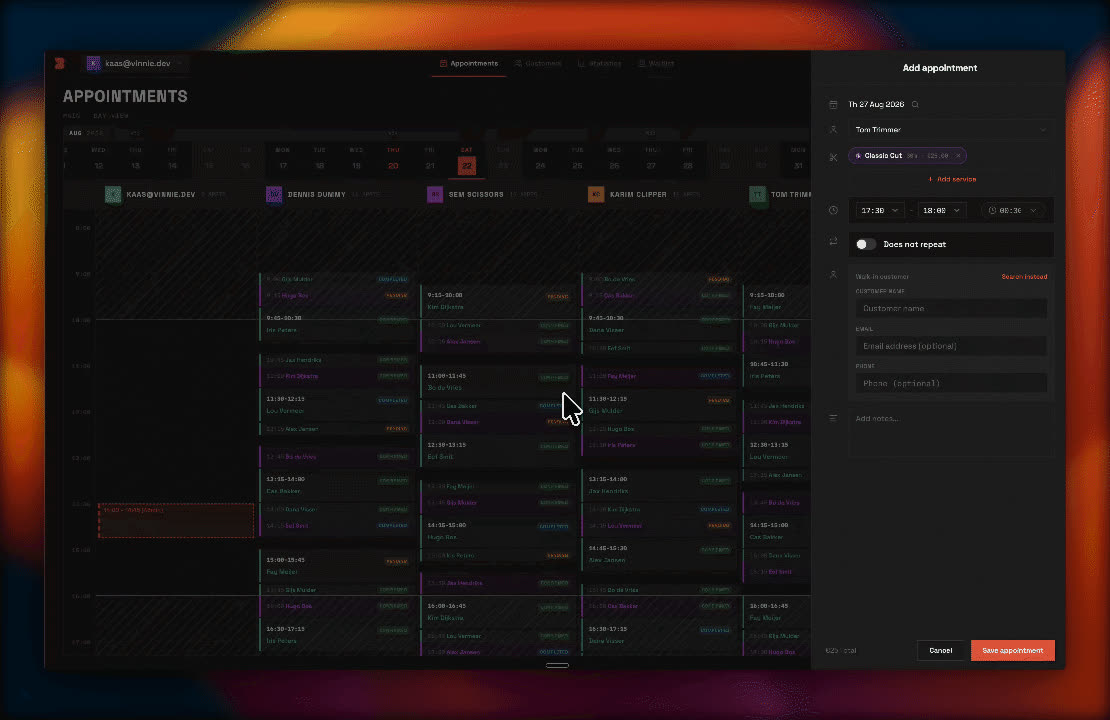
Barberwise has a completely new design, from your calendar to your settings, plus a smarter way to follow up on no-shows.
Appointments
Follow up on no-shows. When you mark a customer as a no-show, you can send them an invitation to book again or ask them to pay a no-show fee, with a personal message if you like. You can then mark the fee as paid.
Changed your mind? You have a few seconds to undo a no-show before any email goes out.
Everything in one place. Appointment details, editing, canceling and repeating now open in a single panel on your computer, and in one sheet on your phone.
Easier recurring appointments. Pick how often and for how long in a couple of taps, see every date with its price in the preview, and the button tells you how many appointments you’re about to create.
Calendar
A new day view that’s clearer to read, in light and dark mode.
New side menu on your computer. Hover over an icon to see all pages in that section.
Opens faster. The app loads quicker the first time you open it.
Statistics & customers
Redesigned customer page. Key figures at the top, upcoming and past appointments in one list you can switch between, and a short overview of no-shows.
Correct total spent. A customer’s total spent now only counts visits that have already happened, not future appointments.
Redesigned statistics. The revenue chart shows its dates correctly again, and percentages are rounded to two decimals.
Settings & subscription
Every settings page redesigned, including services, team, payments and your booking widget.
Adding a location is now a clear, step-by-step page.
Only plans that fit. Plans that are too small for your team or number of locations can no longer be chosen, and you see why.
No surprise downgrades. If your team has grown past a downgrade you scheduled, the downgrade is canceled and we let you know by email.
Signing in
New login, sign-up and welcome screens. Your last-used sign-in method is marked so you can pick it right away.
Back where you were. If you’re signed out while using the app, signing in again takes you back to the page you were on.
No more endless loading after finishing your shop setup or accepting a team invitation.
Your calendar and booking page feel noticeably quicker, times are always shown in your shop's time zone, emails have a fresh new look, and the app is now fully in German.
Appointments
Editing services works as expected. Remove a service from an appointment and save, and it’s gone. Before, the remaining services could be added a second time.
No more double services. An appointment can’t contain the exact same service twice. Two different services, or two options of the same service, still work.
Fairer no-shows for multi-day visits. Marking a multi-day visit as a no-show now only affects the days the customer missed. Days you marked as completed stay completed.
Safer rescheduling. When you move an appointment, every barber on it is checked for availability, not just the first one.
Correct times around clock changes. Editing an appointment on the night the clocks go back keeps its exact time and length, and recurring appointments always land on the right weekday.
Calendar
Live updates are back. New and changed appointments appear on your calendar right away, without refreshing the page.
Faster everywhere. The calendar opens and switches days faster, especially if your shop has several locations.
Always your shop’s time. Times and days in the calendar match your shop’s time zone, even when you open it from a device set to another time zone.
Clock changes handled. On the days the clocks change, appointments are drawn at the right height and a closed day blocks the whole day.
Online booking
Quicker steps. Customers move through the booking steps faster, with a progress bar that shows something is happening.
Next available day. If the chosen day is fully booked, customers are pointed to the next day with open times.
No more false “fully booked”. If times can’t be loaded for a moment, customers see a retry button instead of an empty calendar.
Reliable when it’s busy. Available times load quickly, even when many customers are booking at the same time.
The right times, anywhere. Customers see times in your shop’s time zone, even when booking from abroad, and every time offered on a clock-change day can actually be booked.
Customer emails
A fresh new look. Every email to your customers has a cleaner design with rounded cards and a clear summary of the appointment, in light and dark mode.
Payments
Turn prepayment on or off per location. You can now switch online prepayment on or off for an existing location in its scheduling settings. Turning it on requires a connected Mollie account.
Statistics & customers
Clearer label. The statistic is now called “Completion rate”, because that’s what it measures: the share of finished appointments that were completed.
Everywhere in the app
Fully in German. The whole app is now translated into German. Before, many screens still showed English.
Calendar invites, emails and payments now behave exactly as you'd expect — fewer surprises for you and your customers.
Appointments
When you create a repeating appointment, you now see how many are scheduled over the coming weeks, including the ones that fall outside the week you’re currently viewing.
Calendar invites
When an appointment is canceled, it’s now removed from the customer’s calendar automatically — no leftover event to clean up.
Appointment times in calendar invites now always show in the correct timezone, in any calendar app.
The calendar your customers can subscribe to now has a proper name and refreshes on its own.
Customer emails
Customers can unsubscribe from your emails in one tap, straight from their inbox.
Emails are now set up to reach your customers’ inboxes more reliably.
Payments
Payment amounts are always charged exactly, down to the cent.
Payment receipts are recorded reliably, so a one-off hiccup no longer blocks a payment from going through.
Embed your booking page on your own website with a floating widget — plus you can now correct appointments that were already marked done.
Booking widget
Embed your booking page directly on your own website with a new floating launcher that opens the full booking flow in an overlay — no redirect to a separate page.
Set it up under Settings → Booking Widget: pick the display mode and theme, preview it live, and copy a ready-made snippet to paste onto your site.
Appointments
You can now cancel or mark a no-show on an appointment that was already marked as done, so a visit that never happened can still be corrected.
Loyalty and reviews
When you cancel or mark a no-show on a finished appointment, the loyalty points it earned are taken back and the customer’s tier is updated to match.
The points issued on your loyalty dashboard now leave out points that were taken back.
Waitlist
Customers on the waitlist are no longer offered a time that has already started.
Sign in and sign up with a passkey — no password to type — and loyalty points that now add up on their own after every visit.
Your account
Passkeys. Sign in with a passkey — your face, fingerprint, or device PIN — instead of typing a password.
Create a new account with a passkey too, no password required.
Appointments
On your phone, searching for a customer while creating an appointment now opens a clean full-screen picker instead of a cramped popover.
You can only cancel, reschedule, or mark a no-show on your own appointments — opening a colleague’s booking no longer ends in a confusing “operation failed”.
“Add break” and “Add extra hours” now appear only on the columns you’re allowed to edit, and if a break can’t be saved you see the real reason instead of a generic error.
Filtering your calendar is now a side panel that applies as you toggle — no more Apply button — and the Filters button carries a badge showing how many filters are active.
Appointments in the week, month, and list views of your calendar now show at the location’s local time, even when you open the dashboard from a device set to another timezone.
Your services
Set a service’s length in 5-minute steps, so short services like 20 minutes are pickable again.
Loyalty and reviews
Loyalty points. Points are added automatically once an appointment is done — nothing to click, and they count toward tiers straight away.
Customers can leave a review once their visit is finished.
A no-show warning clears itself after three visits the customer actually turns up for.
Online booking
Once a booking is canceled, its cancel, reschedule, and payment links stop working right away — including when you cancel it yourself from the dashboard.
The order you arrange your services in now shows the same way on your public booking page and website.
On a week that runs into a new month, days in the next or previous month no longer show as fully booked when there are still open times.
Times offered during extra hours can now be booked all the way through, instead of being refused at the final step. If a time is taken while a customer is booking, they’re told right away and sent back to pick another.
Privacy
Details from payments a customer never finished are now cleared automatically after 90 days.
Across the app
Fixed a handful of screens — mileage, the waitlist, and some dashboard panels — that showed a raw label code instead of readable text.
The icon-only action buttons on the waitlist now announce what they do to screen readers.
The busy day view is 3× faster, new bookings land in realtime, plus a smarter time picker, calendar invites in emails, and more reliable online booking.
Appointments
When you add or move an appointment, the time picker now shows how busy each day is at a glance, so you can find a free slot faster.
On your phone, placing, moving, and resizing appointments now works smoothly.
You can now edit a single appointment in a recurring series right in the app.
We’ve made recurring appointments more reliable.
Improved the add and edit appointment experience on both desktop and mobile.
Calendar
New online bookings appear on your staff calendar in realtime — no refresh needed.
The busy day view with many barbers is 3× faster: the freeze while it renders dropped from ~1.2s to under 0.4s, with half as many elements on screen.
Extra opening hours you add for a day now show in the calendar, and customers can book into them.
Days off are clearly marked, and a line shows the current time at a glance.
Selecting a time slot stays within a single day and column, so it’s more predictable on touch.
Online booking
Your booking page now accounts even more accurately for breaks, exceptions, and closed days.
When customers reschedule, they only see times that are genuinely available.
Customers can now cancel or reschedule their own booking up to 24 hours before the appointment (previously 1 hour).
On iPhone, tapping a field in the booking form no longer zooms the page.
Customer emails
Booking confirmation and reschedule emails now include a calendar invite, so customers can add the appointment to their own calendar in one tap. When an appointment moves, the calendar event updates itself.
Team & locations
After accepting a team invite, you land back where you started once you log in or sign up.
Admins can now add new locations, not just the shop owner.
Accessibility
Screen-reader support is improved across the booking flow, the customer list, and form errors.
Reliability
After we ship an update, a normal refresh now loads the latest version — no hard refresh needed.